

I discovered Mermaid recently – a syntax to easily write flowcharts with. It’s integrated into Notion, which I use for a lot of my brainstorming/storing of ideas, so that’s pretty handy!
Idle Cartulary’s amazing Zungeon Manifesto and corresponding Jam rightfully highlights the beauty of Marcia B’s Bite-Sized Dungeons. By varying connections between 6 nodes, you get basically all the small-dungeon-layouts you could ever want.
Marcia B comes to 10 models:

This is where Mermaid comes in handy. It automatically creates flowcharts based on some very simple lines of code, allowing you to just type/adjust on the fly. Obsidian does the same, except Mermaid is just the flowchart. Let’s take #4 as an example:
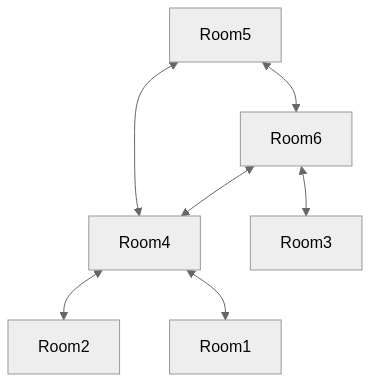
I simply went to Mermaid.live and inserted the code for variation 4 (see below for all the codes).

Under Actions, I copied the Markdown and pasted it into a Markdown element to embed in WordPress.
But, we can do more with this:

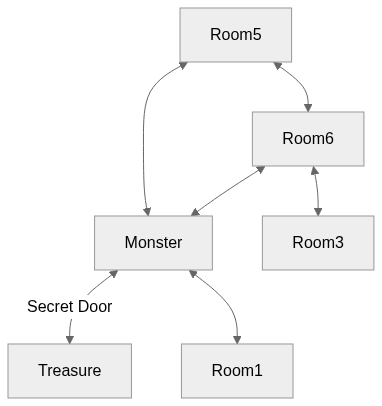
Adding rooms is as simple as just adding a new relation. Full Mermaid syntax can be found here.
Mermaid Flowcharts for all Bite-Sized Dungeons
1
graph TD
  Room1 <--> Room2
  Room2 <--> Room3
  Room4 <--> Room1
  Room5 <--> Room4
  Room5 <--> Room6
  Room6 <--> Room4
2
graph TD
  Room1 <--> Room2
  Room4 <--> Room3
  Room4 <--> Room1
  Room5 <--> Room4
  Room5 <--> Room6
  Room6 <--> Room4
3
graph TD
  Room4 <--> Room2
  Room4 <--> Room3
  Room4 <--> Room1
  Room5 <--> Room4
  Room5 <--> Room6
  Room6 <--> Room4
4
graph TD
  Room4 <--> Room2
  Room6 <--> Room3
  Room4 <--> Room1
  Room5 <--> Room4
  Room5 <--> Room6
  Room6 <--> Room4
5
graph TD
  Room4 <--> Room2
  Room6 <--> Room3
  Room2 <--> Room1
  Room5 <--> Room4
  Room5 <--> Room6
  Room6 <--> Room4
6
graph TD
  Room4 <--> Room2
  Room6 <--> Room3
  Room5 <--> Room1
  Room5 <--> Room4
  Room5 <--> Room6
  Room6 <--> Room4
7
graph TD
  Room1 <--> Room2
  Room1 <--> Room3
  Room3 <--> Room4
  Room4 <--> Room5
  Room5 <--> Room6
  Room6 <--> Room3
8
graph TD
  Room3 <--> Room2
  Room1 <--> Room3
  Room3 <--> Room4
  Room4 <--> Room5
  Room5 <--> Room6
  Room6 <--> Room3
9
graph TD
  Room4 <--> Room2
  Room1 <--> Room3
  Room3 <--> Room4
  Room4 <--> Room5
  Room5 <--> Room6
  Room6 <--> Room3
0
graph TD
  Room4 <--> Room2
  Room1 <--> Room3
  Room3 <--> Room2
  Room4 <--> Room5
  Room5 <--> Room6
  Room6 <--> Room3





Leave a Reply